UTM Tagging Best Practices: How to Track Campaigns in Google Analytics 4
Master UTM tagging best practices for GA4. Learn parameter syntax, naming conventions, channel groupings, redirect preservation, and troubleshooting.
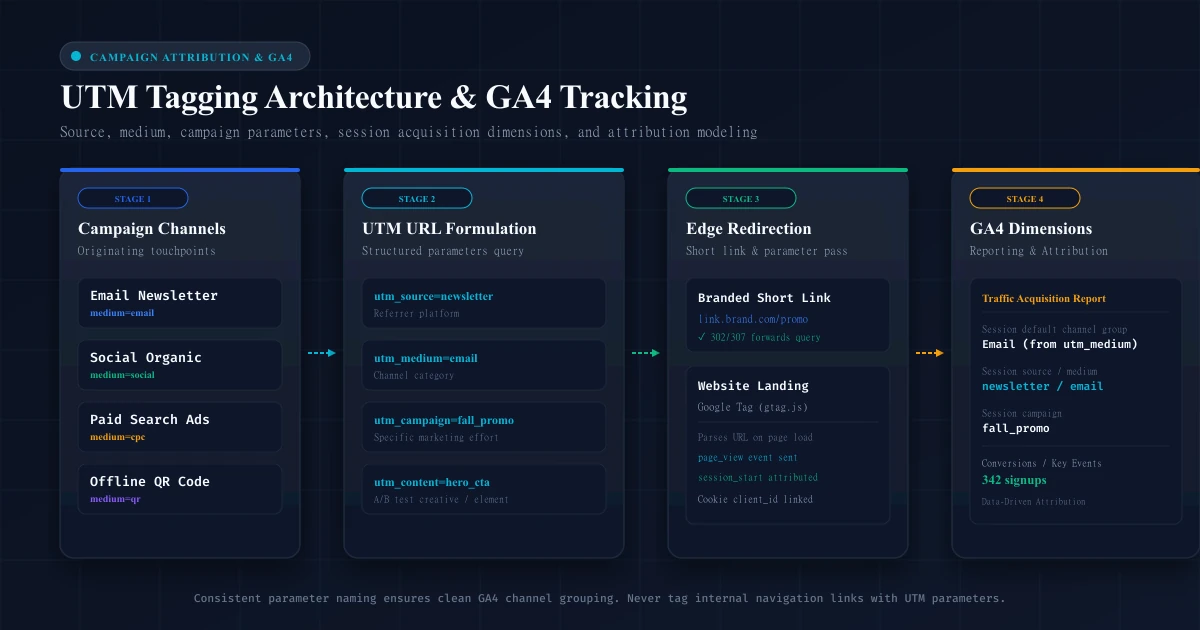
UTM Tagging Best Practices: How to Track Campaigns in Google Analytics 4
Every marketing team faces the same attribution dilemma: you launch an email newsletter, sponsor an industry podcast, share organic updates on LinkedIn, and print QR codes on event collateral—yet when you open Google Analytics 4, half of your traffic lands in an ambiguous bucket labeled Direct or Unassigned.
Without structured campaign tracking, modern web analytics tools cannot distinguish between a high-intent subscriber who clicked a link in your weekly email and an anonymous user who typed your URL directly into a browser tab.
Urchin Tracking Module (UTM) parameters solve this attribution challenge. By appending standardized query parameters to your destination URLs, you instruct Google Analytics 4 (GA4) exactly how to categorize, attribute, and report on inbound traffic.
However, poorly structured UTM tagging can create more problems than it solves. Inconsistent casing, missing medium definitions, and rogue internal UTM links fragment data sets, corrupt channel groupings, and reset user sessions.
This technical guide provides end-to-end UTM tagging best practices for Google Analytics 4, breaks down parameter syntax and attribution mechanics, walks through naming conventions, and shows how to combine UTM tagging with link shorteners and custom domains.
What Are UTM Parameters?
UTM parameters are specific key-value pairs appended to the query string of a URL. Originally developed in the late 1990s by Urchin Software Corporation (which Google acquired in 2005 to build the foundation of Google Analytics), UTM tags remain the undisputed open standard for web traffic attribution.
When a visitor clicks a UTM-tagged hyperlink, their web browser requests the destination server with those parameters attached to the request URI:
https://example.com/pricing?utm_source=newsletter&utm_medium=email&utm_campaign=october_launchWhen the page loads, client-side tracking scripts (such as Google Tag / gtag.js or Google Tag Manager) parse window.location.search, extract the UTM keys, and transmit them alongside the initial pageview and sessionstart events to Google Analytics 4 servers. The web page itself functions normally—query parameters do not alter page layout or content unless custom application scripts are explicitly configured to read them.
Why UTM Tagging Matters for Campaign Tracking
Modern browsers, privacy frameworks, and mobile operating systems aggressively restrict traditional web referrers. When a user clicks a link inside a native desktop email client (such as Apple Mail or Outlook), a private messaging app (like Slack or WhatsApp), or an SMS message, the HTTP request frequently carries no Referer header.
Without UTM tags, GA4 receives an empty referrer string and classifies that visit as Direct / (none).
Effective UTM tagging delivers five core marketing capabilities:
- Eliminates "Dark Traffic": Converts opaque direct visits into measurable marketing channels.
- Standardizes GA4 Channel Groupings: Maps external campaigns directly into GA4's default channels (such as Paid Search, Paid Social, Email, or Affiliates).
- Enables Granular A/B Creative Testing: Distinguishes between top-of-email hero buttons and text footer links using the
utm_contentparameter. - Bridges Offline and Online Touchpoints: Allows printed flyers, billboard signs, and packaging QR codes to be tracked accurately in web analytics.
- Enables Cross-Platform Attribution Modeling: Provides clean input data for GA4's machine-learning-driven attribution models, letting you measure assisted conversions across multi-touch customer journeys.
The Six UTM Parameters Explained
Google Analytics 4 recognizes six standardized UTM parameters. While Universal Analytics traditionally focused on five, GA4 introduced native support for utm_id to streamline cost data imports and integration with external ad management platforms.
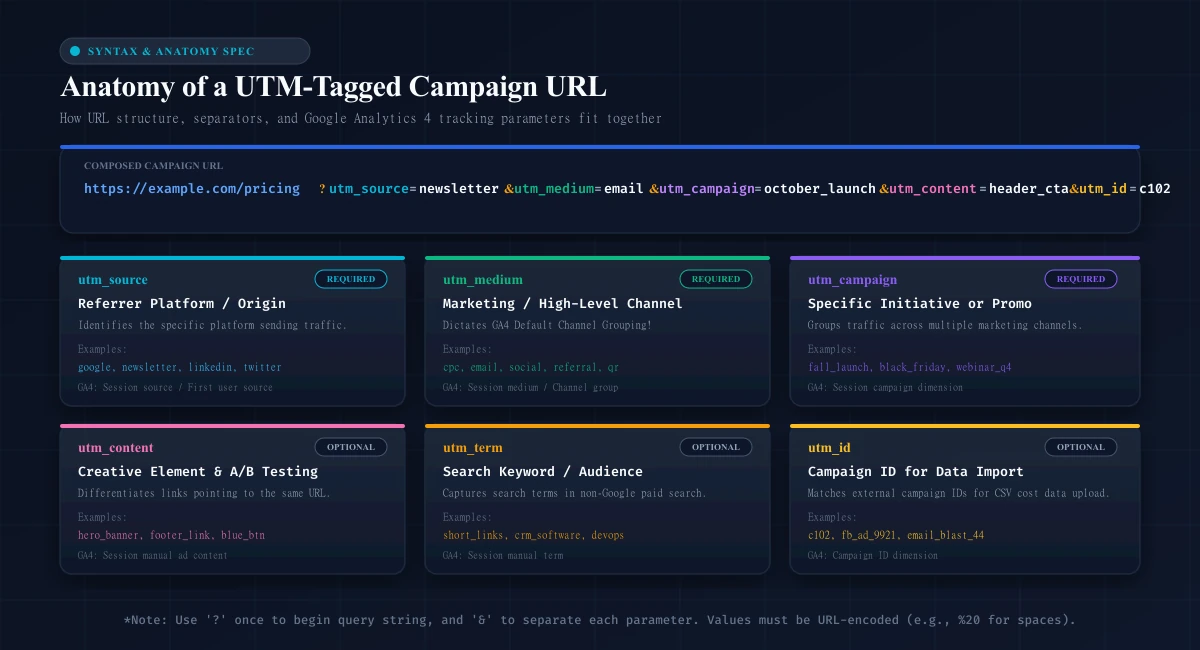
Here is how each parameter functions in GA4:
| Parameter | GA4 Dimension Mapping | Requirement | Purpose & Description | Realistic Example |
|---|---|---|---|---|
utm_source | Session source / First user source | Required | Identifies the specific platform, vendor, or entity sending the traffic (e.g., ad network, newsletter, search engine). | newsletter, google, linkedin, partner_blog |
utm_medium | Session medium / First user medium | Required | Defines the high-level marketing channel or transmission mechanism. Dictates GA4 Default Channel Grouping. | email, cpc, social, referral, qr |
utm_campaign | Session campaign / First user campaign | Required | Identifies the overarching strategic effort, product release, seasonal promo, or marketing initiative. | falllaunch, blackfriday, saassummit2026 |
utm_content | Session manual ad content | Optional | Differentiates creative variations, ad formats, button designs, or link positions pointing to the same URL. | herocta, footerlink, bluebanner, variantb |
utm_term | Session manual term | Optional | Captures paid search keywords or audience segment targeting on non-Google ad platforms. | urlshortener, brandtracking, devops_tools |
utm_id | Campaign ID | Optional | Carries a unique campaign identifier used to match external campaign metadata and cost imports in GA4. | cmp8821, fbad049, promo99 |
1. utm_source
The source answers the question: "Where did the visitor come from?"
It identifies the specific origin of the traffic. For example, if you publish a post on LinkedIn, the source is linkedin. If you send a message through your Customer.io or Substack newsletter, the source might be customerio or weekly_digest.
2. utm_medium
The medium answers the question: "By what mechanism did the visitor arrive?"
This is the most critical parameter in GA4 because GA4 uses utm_medium rules to automatically populate the Default Channel Group dimension. If you use non-standard medium values (like social-media-post instead of social or post instead of email), GA4 cannot classify the traffic and lumps it into Unassigned.
3. utm_campaign
The campaign answers the question: "What marketing initiative drove this click?"
Use this to tie multi-channel marketing efforts together. If you are promoting a major feature update across Google Ads, LinkedIn, an email announcement, and a webinar, use the identical campaign name (e.g., featurev2launch) across all touchpoints to evaluate aggregated performance in GA4.
4. utm_content
The content parameter answers: "Which specific creative or element was clicked?"
This parameter is essential for A/B testing and layout optimization. If an email contains two links to your pricing page—one in the opening paragraph and one in a high-contrast button at the bottom—set utmcontent=textlink on the first and utmcontent=btncta on the second.
5. utm_term
The term parameter answers: "Which keyword or targeting segment triggered the visit?"
While Google Ads automatically captures search query data via native auto-tagging (GCLID), utm_term is necessary when running paid search on non-Google networks (such as Microsoft Advertising, DuckDuckGo, or Reddit Ads) to pass the target keyword into GA4.
6. utm_id
The campaign ID answers: "What database or platform key references this campaign?"
In GA4, utmid allows enterprise teams to upload custom cost and revenue data via CSV or API. Instead of typing long campaign names into every ad, you pass an ID (utmid=camp_104) and GA4 joins the cost and impression metrics in reporting.
How UTM Parameters Work in Google Analytics 4
To analyze campaign performance correctly, you must understand how GA4 ingests, stores, and attributes UTM parameters. GA4 operates very differently from legacy Universal Analytics (UA).
┌────────────────────────────────────────────────────────────────────────┐
│                   GA4 SCOPE ARCHITECTURE FOR UTMS                      │
│                                                                        │
│  User Level:       First user source / medium / campaign                │
│                    (Lifetime attribution: How did they FIRST find you?)│
│                                                                        │
│  Session Level:    Session source / medium / campaign                  │
│                    (Current visit: What drove THIS specific session?)  │
│                                                                        │
│  Event Level:      source / medium / campaign                          │
│                    (Attribution model applied to conversion events)    │
└────────────────────────────────────────────────────────────────────────┘
Session-Scoped vs. User-Scoped Dimensions
GA4 tracks traffic acquisition across two separate scopes:
- User Acquisition (First User Dimensions):
- Dimensions: First user source, First user medium, First user campaign.
- What it measures: The initial marketing touchpoint that introduced a new user to your website on their very first recorded visit. This value is permanently associated with the user's
client_idcookie and never changes on subsequent visits.
- Traffic Acquisition (Session Dimensions):
- Dimensions: Session source, Session medium, Session campaign.
- What it measures: The specific marketing touchpoint that initiated the current browsing session. If a user originally discovered you via organic search three months ago but clicked an email link this morning, their First user medium is
organic, but their Session medium for today's visit isemail.
Reporting Tip: When evaluating the direct impact of an ongoing marketing campaign, always use Session-scoped dimensions in GA4 (Traffic acquisition report) rather than First User dimensions.
How GA4 Determines Default Channel Groups
GA4 uses deterministic regex matching on utmsource and utmmedium to assign visits to Default Channel Groups.
Common rules defined in Google's official documentation include:
- Email:
utmmediumequalsemail,e-mail,email, ore mail. - Paid Search:
utm_mediummatches^(cpc|ppc|paidsearch)$AND source matches a recognized search engine. - Paid Social:
utm_mediummatches^(cpc|ppc|paid.*)$AND source matches a recognized social site (e.g.,linkedin,facebook,twitter). - Organic Social:
utmmediummatches^(social|social-network|social-media|sm|socialnetwork|social_media)$OR source matches a recognized social site with medium not marked as paid. - Affiliates:
utm_mediumequalsaffiliateoraffiliates. - Referral:
utm_mediumequalsreferralorapp.
If you supply a custom medium like utmmedium=promopost, GA4 will not recognize the category and will classify the traffic under Unassigned.
Manual UTMs vs. Google Ads Auto-Tagging (GCLID)
If you run Google Ads campaigns, Google strongly recommends enabling auto-tagging, which automatically appends a unique Google Click Identifier (gclid=...) to destination URLs.
- Auto-tagging passes deep Google Ads data into GA4 that manual UTMs cannot capture, including ad group IDs, search query match types, keyword bids, and ad placement domains.
- If you manually append UTM parameters to Google Ads URLs while auto-tagging is enabled, GA4 by default prioritizes the GCLID data. However, you can configure GA4 property settings under Admin > Data Streams > Web Stream Details > More Tagging Settings to override auto-tagging with manual UTM values if your reporting pipeline requires specific naming schemas.
How to Create a UTM Tracking URL
Constructing a UTM-tagged URL requires strict adherence to RFC 3986 URL standards.
Syntax Anatomy
A URL consists of several discrete segments:
https://example.com/pricing ? utm_source=newsletter & utm_medium=email
└──────────┬───────────────┘ │ └──────────┬─────────┘ │ └─────────┬──────┘
       Base URL              │       Parameter 1      │      Parameter 2
Query Start Delimiter- Base URL: The destination web page (protocol, domain, path), e.g.,
https://example.com/pricing. - Question Mark (
?): Separates the base URL path from the query string. There can only be one question mark in a valid URL. - Key-Value Pairs: Written as
key=value. - Ampersand (
&): Delimits multiple query parameters. Every subsequent parameter after the first must be preceded by an ampersand.
Step-by-Step with the URLShortPilot UTM Builder
Instead of assembling strings by hand and risking syntax typos, marketers use specialized tools. The free URLShortPilot UTM Campaign Builder streamlines this process directly in your browser:
- Enter Your Destination URL: Paste your landing page address (e.g.,
https://example.com/pricing). The tool verifies that the URL has a valid protocol (https://). - Define Campaign Source (
utm_source): Input the platform delivering the click (e.g.,newsletter). - Define Campaign Medium (
utm_medium): Select or enter the transmission channel (e.g.,email). - Enter Campaign Name (
utmcampaign): Provide the project or promotion name (e.g.,octoberlaunch). - Add Optional Parameters: Enter
utmcontent(e.g.,headercta) orutm_termif conducting keyword tests. - Copy or Shorten: Click Copy Campaign URL to grab the fully encoded address, or click Shorten this tagged URL to generate a clean, branded short link.
If you are creating links inside the URLShortPilot authenticated dashboard, our link creation interface includes integrated UTM parameter fields that automatically append and URL-encode tags when storing your link.
UTM Naming Conventions and Best Practices
The greatest threat to analytics integrity is a lack of team-wide naming conventions. Consider what happens when four team members tag links for the same summer promotion:
- Marketer A uses:
utmsource=LinkedIn&utmmedium=Social - Marketer B uses:
utmsource=linkedin&utmmedium=social - Marketer C uses:
utmsource=linkedin.com&utmmedium=organic_social - Marketer D uses:
utmsource=LI&utmmedium=cpc
Because GA4 is strictly case-sensitive, this creates four completely separate source/medium records in your reporting tables. Aggregating the true ROI of the LinkedIn campaign now requires tedious spreadsheet reconciliations.
Rule 1: Always Use Strict Lowercase
Never use capital letters in UTM parameter keys or values.
❌ Bad:  utm_source=Facebook&utm_medium=Paid_Social
✓ Good: utm_source=facebook&utm_medium=paid_social
In GA4, Facebook, facebook, and FACEBOOK represent three distinct sources. Enforcing 100% lowercase across your organization completely eliminates casing fragmentation.
Rule 2: Use Consistent Separators (Prefer snake_case)
When a parameter contains multiple words, separate them with an underscore (_) or a hyphen (-). Choose one standard across your company and never deviate.
❌ Bad:  utm_campaign=summer sale 2026   (converts to ugly %20 in URLs)
❌ Bad:  utm_campaign=SummerSale2026     (hard to read in tables)
✓ Good: utm_campaign=summer_sale_2026   (clean, predictable snake_case)
Never use spaces in parameter values. Spaces force web browsers to inject %20 or + encoding characters, which look unprofessional and clutter analytics dashboards.
Rule 3: Never Use UTM Parameters on Internal Links
This is the single most destructive UTM mistake in digital marketing.
Critical Rule: UTM parameters are strictly designed for external inbound links. Never place UTM tags on internal links within your own website (e.g., banners on your homepage linking to your /pricing page or links inside your blog posts).
Why Internal UTM Tagging Destroys Analytics:
- It Overwrites the Original Attribution: When a user arrives from Google Ads (
utmsource=google&utmmedium=cpc) and clicks an internal banner tagged withutmsource=internalbanner, GA4 immediately ends the original advertising session and attributes all subsequent pageviews and conversions tointernal_banner! - It Artificially Inflates Session Counts: In analytics pipelines, a change in campaign parameters forces the creation of a new session, artificially inflating your session totals and slashing your conversion rates.
- Correct Alternative: To measure clicks on internal banners or navigation elements, use GA4 Custom Events (such as an
internalbannerclickevent tracked via Google Tag Manager) rather than URL query parameters.
Rule 4: Maintain a Centralized UTM Spreadsheet or Registry
Whether you have two marketers or fifty, maintain a centralized master spreadsheet or automated UTM tool where every generated link is recorded. This prevents duplicate campaign names, enforces parameter conventions, and creates an audit trail for past marketing initiatives.
Real UTM Examples for Email, Social Media, Paid Campaigns and QR Codes
Here are real-world, production-ready UTM tagging formulas for major marketing channels using a fictional SaaS website:
1. Email Newsletter Campaign
Promoting a product pricing update in your weekly subscriber digest:
https://example.com/pricing?utm_source=weekly_digest&utm_medium=email&utm_campaign=pricing_update_q4&utm_content=hero_cta_buttonutmsource=weeklydigest: Specific newsletter publication.utm_medium=email: Triggers GA4's native Email channel grouping.utmcampaign=pricingupdate_q4: Campaign name.utmcontent=herocta_button: Distinguishes the top button from text links.
2. LinkedIn Organic Post
Sharing an announcement from your company's official LinkedIn page:
https://example.com/features?utm_source=linkedin&utm_medium=social&utm_campaign=ai_tools_launch&utm_content=carousel_slide_3utm_source=linkedin: Platform origin.utm_medium=social: Maps cleanly to Organic Social in GA4.utmcampaign=aitools_launch: Core product announcement.
3. Meta (Facebook/Instagram) Paid Ad
Running a sponsored carousel ad on Facebook:
https://example.com/signup?utm_source=facebook&utm_medium=cpc&utm_campaign=retargeting_q3&utm_content=video_testimonial_1&utm_id=fb_ad_7721utmmedium=cpc: Triggers Paid Social grouping when paired withutmsource=facebook.utmid=fbad_7721: Matches the ad set ID in Meta Ads Manager.
4. Printed Physical QR Code on Event Banner
Placing a scannable QR code on a conference roll-up banner:
https://example.com/demo?utm_source=saas_summit&utm_medium=qr&utm_campaign=event_booth_2026&utm_content=banner_toputmsource=saassummit: The physical event name.utm_medium=qr: Custom medium identifying physical QR scans.utmcontent=bannertop: Differentiates the booth banner code from handouts.
(For detailed guidance on sizing and printing scannable QR codes without optical degradation, consult our technical guide on QR code print size and resolution best practices.)
How to Find UTM Campaign Data in GA4
Once your tagged links are in circulation, here is where to analyze their performance in Google Analytics 4:
1. The Standard Traffic Acquisition Report
This is the primary report for measuring session-level campaign performance:
- Navigate to Reports > Life cycle > Acquisition > Traffic acquisition.
- By default, the primary dimension displays Session default channel group.
- Click the dimension dropdown and change it to Session source / medium.
- You will see a clean breakdown of visits, e.g.,
newsletter / email,linkedin / social,facebook / cpc. - To drill down into specific campaigns, click the + (plus) sign next to the primary dimension column, search for Session campaign, and add it as a secondary dimension.
- Review your core business metrics across columns: Sessions, Engaged sessions, Engagement rate, and Conversions (Key Events).
2. The Realtime Report and DebugView
Do not wait 24 hours to find out if your tags are working. When testing new links:
- Open Reports > Realtime.
- Scroll to the card labeled Users by Session source / medium or Users by Session campaign.
- Click your test link in an incognito browser window. Within 15–30 seconds, your test session will appear in the Realtime cards.
- For deeper technical inspection, enable the Google Analytics Debugger Chrome extension and view raw event payloads in Admin > DebugView.
UTM Parameters and URL Shorteners
While UTM parameters are essential for tracking, they introduce a major usability problem: they make URLs absurdly long and intimidating.
A standard marketing link can easily exceed 150 characters:
https://example.com/blog/how-to-scale?utm_source=twitter&utm_medium=social&utm_campaign=scale_series_2026&utm_content=infographic_quote&utm_term=saas_growthPasted directly into an X (Twitter) post, an SMS text message, an Instagram bio, or encoded into a QR code for print marketing collateral (where high character counts create dense, hard-to-scan grids—see our QR code print size and resolution guide), long URLs:
- Clutter copy and consume valuable character limits.
- Look suspicious and trigger anti-phishing hesitation among users.
- Often wrap awkwardly onto multiple lines, which can break the hyperlink string when clicked in certain email clients.
The Solution: Shortening Tagged Links
Using a link shortener like URLShortPilot or your own branded custom short domain transforms long tracking strings into concise, memorable links (to evaluate the commercial economics of custom domains, read our guide on measuring branded short links ROI):
https://link.brand.com/scale-guide
              │
              ▼ (302/307 Edge Redirect)
https://example.com/blog/how-to-scale?utm_source=twitter&utm_medium=social&utm_campaign=scale_series_2026...
Technical Requirement: Query Parameter Preservation During Redirects
When using a link management service, the redirect engine must preserve query parameters.
There are two primary architectural workflows for UTM short links:
- Pre-Shortening (Standard): You generate the complete UTM-tagged URL first, and then paste that tagged URL into the shortener as the destination target. When a user clicks
link.brand.com/promo, the server issues an HTTP 302 or 307 redirect whoseLocationheader points directly to the tagged address. - Dynamic Query Forwarding (Pass-Through): If a visitor clicks
link.brand.com/promo?ref=partner, an enterprise shortener dynamically forwards any incoming parameters onto the final destination URL.
In URLShortPilot, links created with attached UTM parameters store the fully compiled query string directly in our PostgreSQL and Redis caching layers. When our edge servers resolve the short code, the redirect returns the complete destination URL with zero latency overhead. For an in-depth breakdown of redirect caching, status codes, and edge routing, read our architectural guide on how URL shorteners work.
Common UTM Tracking Mistakes
Avoid these five critical pitfalls to keep your GA4 data pristine:
1. Inconsistent Casing
As explained earlier, GA4 treats Email, email, and EMAIL as separate rows. Standardize on strict lowercase everywhere.
2. Confusing Source and Medium
Marketers frequently invert these two parameters:
- ❌
utmsource=cpc&utmmedium=google - ✓
utmsource=google&utmmedium=cpc
Remember: Source is the specific entity (Google); Medium is the marketing vehicle (Cost-Per-Click).
3. URL Encoding Failures
If you must use punctuation, ampersands, or non-alphanumeric characters in parameter values, they must be URL-encoded:
- Space =
%20or+ - Ampersand =
%26 - Slash =
%2F
Failing to encode an ampersand inside a campaign name (e.g., utm_campaign=shoes&socks) causes the URL parser to interpret socks as a new query key rather than part of the campaign name!
4. Overwriting Automated Ad Tracking
Do not manually append static UTM tags to ad platforms (like Google Ads or Meta Ads) without checking how their native auto-tagging operates. Overwriting dynamic campaign IDs with static strings can break revenue reporting inside your advertising dashboards.
5. Tagging Internal Search or Navigation Links
Never use UTMs for on-site navigation. It destroys session attribution, erases original traffic sources, and inflates session counts. Use event tracking instead.
Troubleshooting Missing or Incorrect GA4 Campaign Data
If your UTM campaign traffic is not showing up as expected in GA4, check these common technical root causes:
1. Traffic Classified as "(not set)" or "Unassigned"
- Cause: The
utmmediumorutmsourcevalues do not match any of GA4's Default Channel Group definitions. - Fix: Check Google's official Default Channel Grouping table. Ensure your medium is an exact match (e.g.,
cpc,email,social,affiliate).
2. Website Redirects Stripping Query Parameters
- Cause: Your web server or CMS enforces canonical redirects (e.g., HTTP to HTTPS, non-www to www, or trailing slash rewrites) that fail to pass query parameters.
- Example: User clicks
http://example.com/page?utm_source=test. - Server redirects to
https://example.com/page(query string dropped!). - Diagnostic: Run a
curlinspection in your terminal to inspect theLocationheader during redirects:
curl -IL "https://example.com/old-page?utm_source=test&utm_medium=email"Ensure every intermediate HTTP redirect preserves the ?utm_source=... string in the target header. To understand how status codes affect redirect preservation and browser caching, consult our comprehensive guide on 301 vs 302 redirects and SEO impact.
3. GA4 Reporting Latency
- Standard GA4 exploration and detail reports take 24 to 48 hours to process and display complete session attribution data.
- Do not assume your tags failed because you do not see them in standard reports today. Always use Realtime or DebugView to verify live incoming events immediately.
4. Consent Mode and Ad Blockers
- In regions governed by GDPR, ePrivacy, or CCPA, users who reject cookie consent will have tracking scripts restricted or run in cookieless ping mode (
analytics_storage='denied'). - Similarly, privacy-focused browsers (such as Brave) and strict ad-blocking extensions strip common UTM parameters from URLs. No attribution system can capture 100% of web traffic; expect a realistic 5–15% measurement variance compared to raw server-side click logs.
UTM Tracking Checklist
Before launching your next marketing campaign, run through this pre-flight verification checklist:
- [ ] Base URL Verified: The destination URL is active, returns HTTP 200, and does not redirect to a different path.
- [ ] All Three Core Parameters Included:
utmsource,utmmedium, andutm_campaignare present. - [ ] Strict Lowercase Applied: All parameter keys and values are 100% lowercase.
- [ ] Separators Standardized: Multi-word phrases use
snake_caseorkebab-case(no spaces). - [ ] GA4 Channel Compliance:
utm_mediummatches a standard GA4 channel category (email,social,cpc,referral). - [ ] No Internal Links Tagged: The link is strictly for external channels, never on-site navigation.
- [ ] Proper Encoding: Special characters are URL-encoded (
%20,%26). - [ ] Redirect Safe: If the link redirects or uses a link shortener, query parameters survive through to the final destination.
- [ ] Shortened for Usability: Long tracking links are condensed using a branded short domain.
- [ ] Realtime Verified: The link was clicked in an incognito window and verified inside GA4 Realtime reports.
Frequently Asked Questions
Are UTM parameters case-sensitive in Google Analytics 4?
Yes. GA4 treats utmsource=twitter, utmsource=Twitter, and utm_source=TWITTER as three separate traffic sources. Always enforce lowercase conventions across your marketing team to maintain unified reporting.
What is the difference between utmsource and utmmedium?
The source is the specific platform or entity delivering the visitor (e.g., google, linkedin, newsletter). The medium is the high-level marketing channel or mechanism (e.g., cpc, social, email, referral). GA4 relies primarily on the medium to assign traffic to Default Channel Groups.
Do UTM parameters hurt SEO?
No. Googlebot and other major search engines recognize UTM parameters as tracking tags. They do not penalize pages for having UTM parameters. However, to avoid duplicate content indexing in Google Search, ensure your landing pages include a self-referencing canonical tag (<link rel="canonical" href="https://example.com/page" />) pointing to the clean base URL without query strings.
Can I use UTM parameters inside my own website?
No. Never use UTM parameters on internal website links (such as navigation menus, related articles, or homepage banners). Doing so immediately resets the user's session and overwrites their original external acquisition source in GA4. Use GA4 custom events instead.
How do I track QR codes in GA4 with UTMs?
Set utmsource to the event or distribution location (e.g., techconference), utmmedium=qr (or offline), and utmcampaign to your promotional initiative. Shorten the tagged URL using URLShortPilot before generating the QR code to keep the symbol sparse and easily scannable on mobile devices.
Conclusion and Next Steps
UTM tagging is the foundation of dependable digital marketing attribution. By establishing strict naming conventions, utilizing the six standardized GA4 parameters, and testing links before launch, you replace guesswork with clear, actionable campaign ROI data.
Ready to build clean, error-free campaign links in seconds? Try our free URLShortPilot UTM Campaign Builder to generate standardized, fully encoded URLs, and pair them with custom branded short links to maximize click-through rates across all your marketing channels.
Ready to streamline your links?
Create fast, secure short links with real-time analytics, custom domains, and enterprise-grade anti-abuse protections.
Related Technical Guides
Branded Short Links ROI: How to Measure the Value of Branded URLs
Learn how to measure the ROI of branded short links: formulas for incremental contribution profit, A/B testing protocols, GA4 attribution, and domain cost analysis.
301 vs 302 Redirects: Differences, SEO Impact & Best Practices
Learn the differences between 301 and 302 redirects: SEO impact, link equity, browser caching, 307 vs 308, and why URL shorteners use temporary redirects.
QR Code Print Size & Resolution Guide: DPI, Dimensions and Best Practices
Master QR code print size, resolution, and DPI calculations. Learn minimum dimensions, quiet zone rules, error correction trade-offs, and prepress testing.