How to Set Up a Custom Short Domain: Complete Guide
A complete technical guide to setting up a custom short domain for branded links: CNAME and TXT DNS records, domain ownership verification, automated SSL/TLS certificates, and troubleshooting.
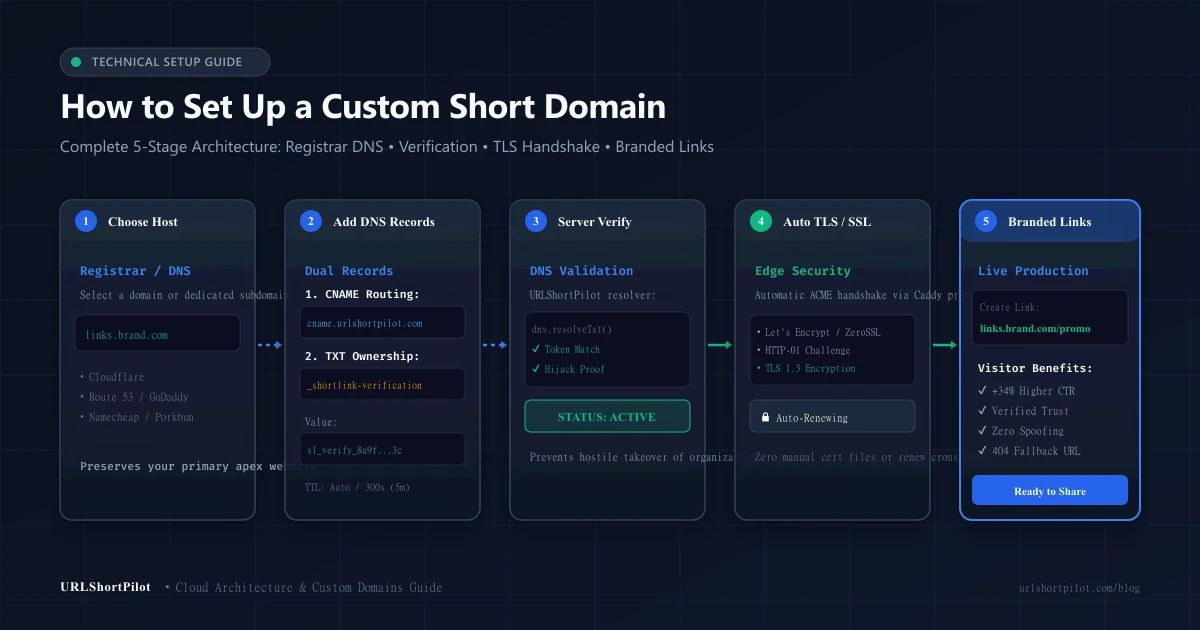
How to Set Up a Custom Short Domain: Complete Guide
A custom short domain (also called a branded short link domain) transforms generic shortened URLs into recognizable, trusted brand assets. Instead of sharing generic third-party links like tinyurl.com/xyz123 or default system URLs, your links carry your own identity—such as links.yourbrand.com/spring-sale or go.acme.co/launch.
Setting up a branded link domain bridges domain name system (DNS) routing with modern edge redirect infrastructure. When implemented correctly, it improves click-through rates, protects brand authority, and ensures enterprise-grade redirect performance.
In this practical technical guide, you will learn how to set up a custom short domain step-by-step: from choosing between an apex domain and a subdomain, configuring CNAME and TXT verification records, and automating SSL/TLS certificate issuance, to diagnosing DNS propagation issues using standard command-line tools.
What Is a Custom Short Domain?
A custom short domain is a dedicated hostname—either a standalone domain (such as brand.link) or a subdomain (such as links.yourcompany.com)—configured to route through a URL shortening platform rather than a traditional web server.
When a visitor clicks a branded short link, the request resolves through your DNS provider to the link management platform's edge proxies. The platform looks up the short code, logs click telemetry, and issues an immediate HTTP redirect (such as an HTTP 301, 302, or 307) to the target web address.
To understand the underlying server mechanics and caching layers powering these redirects, see our comprehensive architectural breakdown on how URL shorteners work.
[ Visitor Clicks Link ]
       │
       ▼
https://links.yourbrand.com/promo
       │
       ├─► 1. DNS Resolution: CNAME points to cname.urlshortpilot.com
       ├─► 2. Edge Proxy: Terminate TLS & match Host header
       ├─► 3. Database & Cache: Lookup destination URL
       └─► 4. HTTP Redirect (302/307): Location: https://yourbrand.com/landing-page
Why Use a Branded Short Domain?
Sharing generic shortened links in corporate communications, marketing campaigns, or SMS messages introduces significant operational friction. Branded links solve four critical challenges:
1. Significant Click-Through Rate (CTR) Increases
Industry marketing studies consistently demonstrate that branded short links achieve between 20% and 39% higher click-through rates compared to generic short links. When users recognize the organizational domain in an SMS text message, social post, or email signature, they interact with substantially higher confidence.
2. Elimination of Phishing & Malware Skepticism
Cybercriminals frequently exploit free public shorteners to conceal phishing kits and malicious payloads. Consequently, enterprise firewalls, spam filters, and privacy-conscious users treat generic short links with suspicion. A custom domain guarantees that every shared link visibly originates from your verified organizational infrastructure.
3. Preserved Brand Real Estate Across Social & Print
Every shared link is a brand touchpoint. Instead of promoting a third-party shortening vendor, your domain remains front and center. When paired with a QR code generator for packaging or event collateral, branded links reinforce visual legitimacy.
4. Enterprise Governance & Anti-Takeover Protection
If a third-party shortening service deprecates an API or experiences domain blacklisting, organizations relying on shared domains lose link equity. Owning the custom domain gives you full autonomy: you can update routing, alter destinations, or point DNS records elsewhere at any time.
Custom Domain vs. Subdomain: Which Should You Choose?
Before modifying DNS settings, you must decide between configuring a subdomain or a dedicated apex domain.
| Architecture Type | Example Hostname | Primary Use Case | DNS Compatibility | Recommendation |
|---|---|---|---|---|
| Dedicated Subdomain | links.brand.com<br>go.brand.com<br>s.brand.com | Existing companies with an active main website on brand.com. | 100% CNAME Compatible: Standard RFC 1034 compliant across all DNS hosts without interfering with root records. | Recommended for 90% of organizations. |
| Dedicated Apex Domain | brand.link<br>getbrand.co<br>brand.to | Organizations wanting an ultrashort vanity domain exclusively for link sharing. | Requires CNAME Flattening or ALIAS/ANAME: Apex root cannot use standard CNAME if MX/TXT email records exist. | Ideal if you purchase a separate short domain. |
[!TIP]
Why Subdomains Are Preferred for Established Brands:
If you already host a website or receive corporate email onyourbrand.com, do not point your apex domain to a link shortener. Pointing your apex domain will conflict with existingArecords or emailMXrecords. Instead, create a dedicated subdomain likelinks.yourbrand.comorgo.yourbrand.com.
What You Need Before Starting
Before beginning the configuration in URLShortPilot, ensure you have:
- DNS Administrative Access: Access to the management console of your domain registrar or DNS hosting provider (such as Cloudflare, AWS Route 53, Namecheap, GoDaddy, Porkbun, or Google Cloud DNS).
- URLShortPilot Account with Custom Domain Entitlement: Custom domain routing is available on Pro (up to 3 custom domains), Business (up to 10 custom domains), and Enterprise (up to 50 custom domains) plans. Review feature tiers on our pricing page.
- Decided Hostname: An approved domain or subdomain format (for example,
links.company.com).
Step-by-Step: Set Up a Custom Short Domain in URLShortPilot
Connecting a branded domain takes less than five minutes through URLShortPilot's automated domain engine.
Step 1: Open Custom Domains in Your Dashboard
- Log in to your URLShortPilot dashboard.
- In the left-hand navigation sidebar, navigate to Custom Domains (or open our dedicated custom short URLs hub).
- Click the "Add Domain" button in the top right corner.
Step 2: Enter Your Domain & Fallback URL
- Domain Name: Enter your intended hostname in lowercase characters (for example,
links.yourbrand.com). - Default Fallback Destination (Optional but Recommended): Specify where visitors should be redirected if they visit the root domain directly without a short slug (for example, navigating to
https://links.yourbrand.com/redirects directly to your homepagehttps://yourbrand.com). - Click "Register Domain".
┌────────────────────────────────────────────────────────┐
│  Add Custom Domain                                     │
├────────────────────────────────────────────────────────┤
│  Domain Hostname:                                      │
│  [ links.yourbrand.com                               ] │
│                                                        │
│  Root Fallback URL (Optional):                         │
│  [ https://yourbrand.com                             ] │
│                                                        │
│  [ Cancel ]                        [ Register Domain ] │
└────────────────────────────────────────────────────────┘
Once submitted, URLShortPilot initializes your domain in PENDING status and displays two required DNS records: a CNAME record for traffic routing and a unique TXT record for cryptographic ownership verification.
DNS Configuration: CNAME, A, AAAA, and TXT Records
To route traffic to your branded links while proving domain authority, you must add two distinct records in your DNS manager.
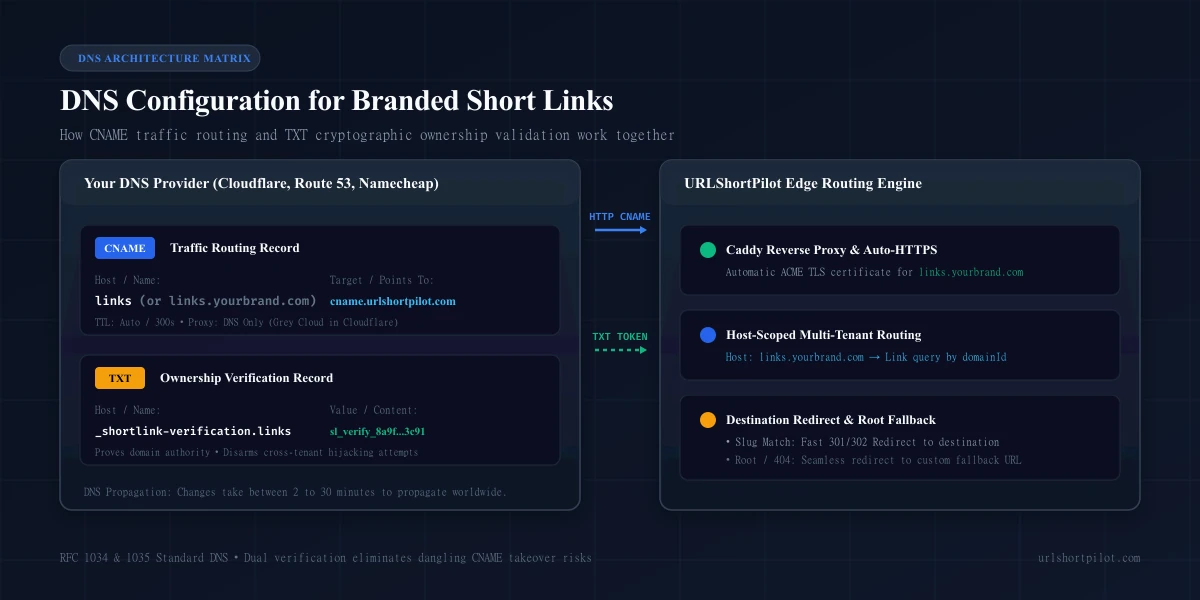
Record 1: The CNAME Record (Traffic Routing)
The Canonical Name (CNAME) record maps your chosen subdomain to URLShortPilot's edge reverse proxy.
- Record Type:
CNAME - Host / Name:
links(orlinks.yourbrand.com, depending on your registrar's interface) - Target / Value:
cname.urlshortpilot.com - TTL (Time to Live):
300 seconds(5 minutes) orAuto
Record 2: The TXT Record (Cryptographic Ownership Proof)
To prevent cross-tenant domain hijacking—where an unauthorized party attempts to claim your branded domain on a shortening service—URLShortPilot enforces cryptographic ownership validation via a dedicated TXT record.
- Record Type:
TXT - Host / Name:
shortlink-verification.links(orshortlink-verification.links.yourbrand.com) - Value:
slverifyxxxxxxxxxxxxxxxxxxxxxxxxxxxxxxxx(your unique 32-character token) - TTL:
300 secondsorAuto
Registrar-Specific DNS Guides
Depending on your registrar, the user interface for entering records varies slightly:
1. Cloudflare DNS Setup
Cloudflare is the most popular DNS manager for SaaS platforms. Follow these precise instructions:
- Log in to the Cloudflare dashboard and select your domain.
- Click DNS → Records → Add record.
- CNAME Record:
- Type:
CNAME - Name:
links - Target:
cname.urlshortpilot.com - Proxy status: DNS Only (Grey Cloud).
[!IMPORTANT]
Disable Cloudflare Orange Cloud (Proxy): You must set the CNAME record to DNS Only (grey cloud icon). If Cloudflare's orange cloud proxy is enabled, Cloudflare intercepts the SSL handshake, preventing our edge proxy from issuing Let's Encrypt certificates directly.
- TTL:
Auto
- TXT Record:
- Type:
TXT - Name:
_shortlink-verification.links - Content:
slverify... - TTL:
Auto
- Click Save.
2. AWS Route 53
- Open the Route 53 console and navigate to Hosted zones.
- Select your domain and click Create record.
- Create CNAME:
- Record name:
links - Record type:
CNAME - Value:
cname.urlshortpilot.com - TTL:
300
- Create TXT:
- Record name:
_shortlink-verification.links - Record type:
TXT - Value:
"slverify..."(include surrounding quotes if prompted) - TTL:
300
- Click Create records.
3. Namecheap
- Navigate to Domain List → click Manage next to your domain.
- Click the Advanced DNS tab.
- Click Add New Record:
- CNAME: Type:
CNAME Record, Host:links, Target:cname.urlshortpilot.com, TTL:Automatic. - TXT: Type:
TXT Record, Host:shortlink-verification.links, Value:slverify_..., TTL:Automatic.
- Click the green checkmark to save both records.
Domain Verification and Ownership
Once your DNS records are saved, return to the URLShortPilot dashboard and click "Verify Domain".
[ Domain Registration in URLShortPilot ]
                   │
                   ▼
[ Background DNS Query: _shortlink-verification.links.brand.com ]
                   │
       ┌───────────┴───────────┐
       ▼                       ▼
[ Token Matches ]       [ Token Missing / Mismatched ]
       │                       │
       ▼                       ▼
Status: ACTIVE          Status: FAILED / PENDING
Auto-Provision TLS      Display Resolution Error Details
How Server-Side Validation Works
When you trigger verification, URLShortPilot executes server-side DNS queries using native Node.js asynchronous resolvers (dns.promises.resolveTxt). The resolver queries authoritative name servers for _shortlink-verification.yourdomain.com:
- If the TXT record exists and the token matches your database record, status changes from
VERIFYINGtoACTIVE. - The domain is registered with our edge reverse proxy to initialize SSL/TLS certificate acquisition.
- If the TXT record cannot be resolved or contains an incorrect token, the system returns an informative diagnostic message indicating that DNS propagation is in progress.
HTTPS, TLS Certificates, and Redirect Security
Every branded short domain configured on URLShortPilot is automatically protected with an enterprise-grade SSL/TLS certificate at no additional cost.
Zero-Configuration Automatic HTTPS
URLShortPilot utilizes an automated reverse proxy architecture (powered by Caddy v2) that communicates directly with Let's Encrypt and ZeroSSL via the ACME (Automated Certificate Management Environment) protocol.
- HTTP-01 Challenge: As soon as your CNAME record points to our proxy, the ACME client provisions an SSL certificate by completing an automated cryptographic HTTP-01 challenge over port 80.
- Modern Encryption: Certificates support modern TLS 1.2 and TLS 1.3 cipher suites with HTTP/2 and HTTP/3 support for minimum redirect latency.
- Automated 90-Day Renewal: Certificates renew automatically in the background 30 days prior to expiration. You never need to upload
.crtfiles, manage private keys, or configure manual renewal cron jobs.
Security Defenses
All redirects served over custom domains benefit from URLShortPilot's core security mechanisms:
- Real-time destination domain blocklists preventing phishing link creation.
- Server-Side Request Forgery (SSRF) filters preventing links from targeting private IP spaces (
10.0.0.0/8,192.168.0.0/16,127.0.0.1). - Diagnostic inspection utilities such as our free redirect checker.
Creating Your First Branded Short Link
Once your domain status displays as ACTIVE, you can immediately generate short links with your custom domain:
- Click "Create Link" in your URLShortPilot dashboard.
- In the Domain dropdown, choose your verified branded domain (for example,
links.yourbrand.com) instead of the default platform domain. - Destination URL: Paste your target web address (for example,
https://yourbrand.com/products/headphones?utm_source=sms). You can also use our integrated UTM builder to assemble campaign parameters automatically. - Custom Vanity Alias: Enter a memorable keyword (such as
summer-saleorvip-pass), or leave it blank to let our unbiased Base62 generator assign a random token. - Click "Create Short Link".
- Your live short link is generated immediately:
https://links.yourbrand.com/summer-saleTesting Your Custom Domain
Before rolling out your branded links in marketing materials, verify DNS resolution and TLS termination using standard command-line utilities.
1. Test DNS Resolution with dig
Run dig in your terminal to confirm your CNAME points to URLShortPilot:
# Check CNAME routing
dig CNAME links.yourbrand.com +short
# Expected output: cname.urlshortpilot.com.

# Check TXT verification token
dig TXT _shortlink-verification.links.yourbrand.com +short
# Expected output: "sl_verify_8a9f..."
On Windows machines without dig, use nslookup:
# Windows PowerShell
Resolve-DnsName -Name links.yourbrand.com -Type CNAME
Resolve-DnsName -Name _shortlink-verification.links.yourbrand.com -Type TXT
2. Verify HTTPS Redirection with curl
Execute an HTTP HEAD request to inspect response headers without loading the full web page:
curl -ILs https://links.yourbrand.com/summer-sale | grep -E "HTTP|location"Expected Response:
HTTP/2 302
location: https://yourbrand.com/products/headphones?utm_source=sms
Troubleshooting Common DNS and SSL Problems
If your domain verification fails or redirects fail to load, consult this diagnostic reference:
| Issue / Symptom | Root Cause | Solution |
|---|---|---|
| "Could not resolve TXT record" | DNS propagation delay or registrar host formatting error. | Many registrars (like Namecheap or GoDaddy) automatically append your domain. If you enter shortlink-verification.links.brand.com in the Host field, it creates shortlink-verification.links.brand.com.brand.com. Fix: Enter only _shortlink-verification.links in the Host field. |
| "SSL Handshake Failed" or Error 525 | Cloudflare Orange Cloud (Proxy) is enabled on the CNAME record. | Open Cloudflare DNS, edit the CNAME record, and switch the proxy toggle from Proxied (Orange) to DNS Only (Grey). Wait 2 minutes and retry. |
| "CNAME and A record conflict" | Attempted to assign a CNAME to an apex domain (brand.com) where existing A or MX records exist. | RFC 1034 prohibits CNAME records on the apex root alongside other record types. Fix: Use a subdomain (links.brand.com) or switch to a DNS provider that supports CNAME Flattening (like Cloudflare). |
| "Certificate Issuance Blocked (CAA Error)" | Your DNS zone has strict CAA records restricting certificate authorities. | Add issue "letsencrypt.org" and issue "zerossl.com" to your domain's CAA DNS records to permit certificate generation. |
| Verification succeeds, but links return 404 | Short link was created on the default domain rather than the custom domain. | Edit the link in your dashboard and ensure the Domain dropdown is set to your custom domain. Short codes are scoped to specific domains to prevent naming collisions. |
Best Practices for Branded Links
To maximize long-term marketing ROI and operational durability, adopt these domain best practices:
- Keep Subdomains Short & Actionable:
Choose compact, relevant prefixes like go., links., app., or s.. Shorter prefixes leave more character space for SMS limits and social media feeds.
- Always Configure a Root Fallback URL:
Visitors occasionally truncate short links to explore the root domain (https://links.brand.com/). Without a fallback destination, visitors encounter a generic error page. Configure your fallback URL to point to your main corporate homepage or product catalog.
- Use Dedicated Domains for High-Volume SMS:
If your organization sends tens of thousands of marketing text messages monthly, consider acquiring a dedicated vanity domain (like company.co or brand.shop) exclusively for messaging. This isolates your primary domain reputation from carrier spam filtering heuristics.
- Pair with Dynamic QR Codes:
When generating physical media, use our URL shortener to create dynamic links. If you ever update the destination marketing campaign, the printed QR code continues working seamlessly through your branded domain.
Frequently Asked Questions (FAQ)
Can I use my main website domain as my short link domain?
No, not if you already host a website or email service on that exact hostname. A single hostname can only point to one destination server at a time. If you point yourcompany.com to URLShortPilot, your corporate website will be replaced by our redirect service. Instead, create a subdomain such as links.yourcompany.com.
How long does DNS verification take?
Most modern DNS hosts (Cloudflare, Route 53, Namecheap) propagate changes within 2 to 15 minutes. However, depending on your domain's previous TTL settings, full worldwide propagation can take up to 24–48 hours.
Does using a custom domain help SEO?
Indirectly, yes. While search engines treat 301 and 302 redirects similarly regardless of domain prefix, branded domains generate higher click-through rates, more organic social shares, and greater brand recall. For deeper analysis on search engine handling of link redirects, see our guide on URL shorteners and SEO.
Can I connect multiple custom domains to one account?
Yes. URLShortPilot supports multi-tenant domain mapping: Pro plans support up to 3 custom domains, Business plans support up to 10, and Enterprise plans support up to 50 custom domains. Each domain maintains its own independent vanity aliases, root fallback URLs, and click analytics rollups.
Final Checklist & Next Steps
Ready to brand your links? Follow this quick completion checklist:
- [ ] Select your subdomain (for example,
links.yourbrand.com). - [ ] Add the domain in the URLShortPilot dashboard.
- [ ] Add the
CNAMErecord pointing tocname.urlshortpilot.com(DNS Only / unproxied). - [ ] Add the
TXTrecord with your uniqueslverify...token. - [ ] Click "Verify Domain" in your dashboard.
- [ ] Confirm automatic SSL/TLS certificate activation.
- [ ] Create your first branded short link and test redirection.
Enhance your link management infrastructure with custom domains, automated UTM tracking, and real-time analytics. Explore our custom short URLs feature or get started with URLShortPilot today.
Ready to streamline your links?
Create fast, secure short links with real-time analytics, custom domains, and enterprise-grade anti-abuse protections.
Related Technical Guides
301 vs 302 Redirects: Differences, SEO Impact & Best Practices
Learn the differences between 301 and 302 redirects: SEO impact, link equity, browser caching, 307 vs 308, and why URL shorteners use temporary redirects.
UTM Tagging Best Practices: How to Track Campaigns in Google Analytics 4
Master UTM tagging best practices for GA4. Learn parameter syntax, naming conventions, channel groupings, redirect preservation, and troubleshooting.
QR Code Print Size & Resolution Guide: DPI, Dimensions and Best Practices
Master QR code print size, resolution, and DPI calculations. Learn minimum dimensions, quiet zone rules, error correction trade-offs, and prepress testing.