301 vs 302 Redirects: Differences, SEO Impact & Best Practices
Learn the differences between 301 and 302 redirects: SEO impact, link equity, browser caching, 307 vs 308, and why URL shorteners use temporary redirects.
301 vs 302 Redirects: Differences, SEO Impact & Best Practices
Whether you are migrating an enterprise website to a new domain, restructuring your blog's URL hierarchy, running temporary marketing campaigns, or managing branded short links, URL redirects are a fundamental building block of modern web architecture.
Yet among developers and digital marketers, few HTTP concepts generate as much confusion—and carry as much search engine optimization (SEO) risk—as the choice between an HTTP 301 (Moved Permanently) and an HTTP 302 (Found / Temporary Redirect).
Choose the wrong status code during a major site migration, and search engines may refuse to index your new URLs or transfer historical ranking signals. Conversely, use a permanent redirect on a dynamic campaign link or URL shortener, and web browsers will cache the destination locally on users' devices, blinding your analytics systems and preventing you from ever updating the destination target.
This technical guide cuts through common SEO myths. Based on current RFC 9110 standards, official Google Search Central documentation, and modern edge routing practices, we break down the architectural differences between 301 and 302 redirects, explain their modern counterparts (307 and 308), analyze their caching behavior, and provide actionable terminal commands to inspect redirect chains.
What Is an HTTP Redirect?
An HTTP redirect is a server response that instructs a web client (such as a browser, mobile application, or search engine crawler) that the requested resource is located at a different Uniform Resource Identifier (URI).
When a client sends an HTTP GET request for a URL:
GET /old-page HTTP/1.1
Host: example.com
Instead of returning an HTML payload with an HTTP 200 OK status, the web server responds with a 3xx Redirection status code accompanied by a Location response header:
HTTP/1.1 301 Moved Permanently
Location: https://example.com/new-page
Content-Length: 0
Upon reading the Location header, the browser automatically dispatches a subsequent HTTP request to the new address (https://example.com/new-page), completing the redirection without requiring manual user intervention.
Server-Side HTTP vs. Client-Side Redirects
It is essential to distinguish true server-side HTTP redirects (status codes 301, 302, 307, 308) from client-side redirects:
- Meta Refresh: An HTML tag (
<meta http-equiv="refresh" content="0; url=...">) executed by the browser after parsing the HTML document head. - JavaScript Redirects: Scripts utilizing
window.location.replace("...")executed in the browser runtime.
While Googlebot can render JavaScript and follow meta refresh tags, search engines strongly prefer server-side HTTP redirects. Server-side redirects resolve immediately at the network edge, require zero JavaScript rendering budget, and transmit explicit, unambiguous canonicalization directives.
What Is a 301 Redirect?
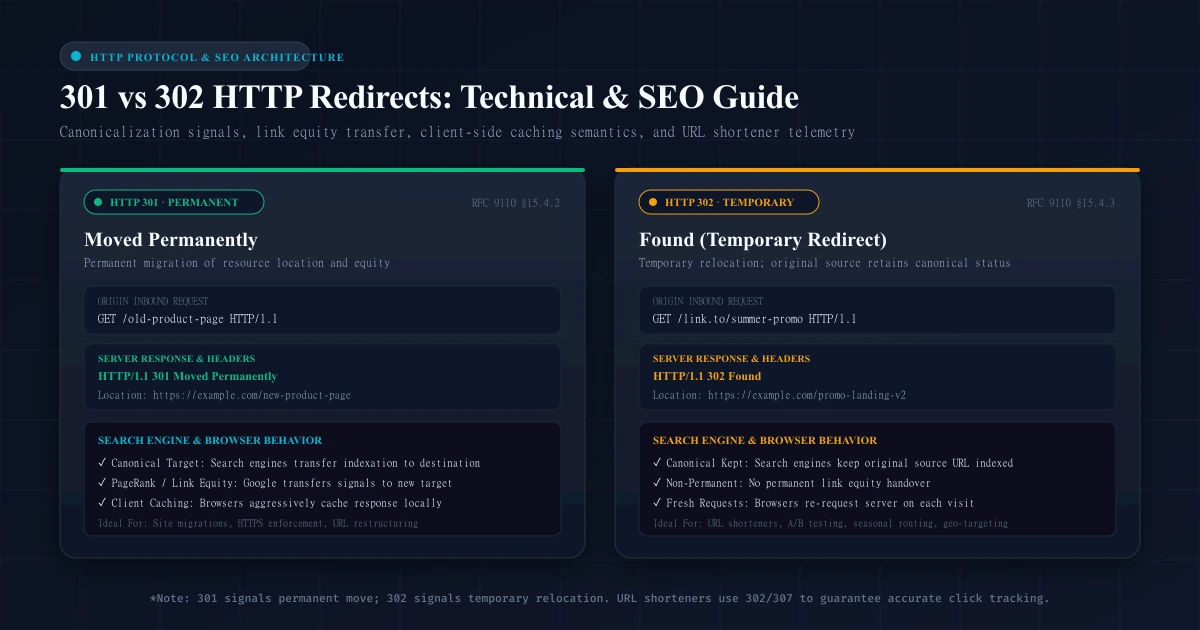
An HTTP 301 Moved Permanently status code indicates that the requested resource has been assigned a new permanent URI and that any future references to this resource ought to use one of the returned URIs (as defined in RFC 9110 Section 15.4.2).
Technical Characteristics of a 301 Redirect:
- Permanent Intent: Signals to web clients, search engines, and caching proxies that the original URL is permanently retired and will never return.
- Aggressive Client Caching: Because the relocation is declared permanent, web browsers and HTTP intermediaries cache 301 responses locally on the client's device by default (unless overridden by explicit
Cache-Controlresponse directives). - Canonical Transfer: Signals to search engine indexers that the destination URL should replace the requested URL in search result listings.
- Historical Method Mutation: In early HTTP/1.0 and HTTP/1.1 specifications, web browsers historically rewritten non-idempotent HTTP methods (such as
POST) intoGETrequests when following a 301 redirect.
What Is a 302 Redirect?
An HTTP 302 Found status code indicates that the target resource resides temporarily under a different URI (RFC 9110 Section 15.4.3). In the original HTTP/1.0 specification (RFC 1945), 302 was labeled Moved Temporarily, but was renamed to Found in HTTP/1.1 to reflect that the resource is merely temporarily accessible elsewhere.
Technical Characteristics of a 302 Redirect:
- Temporary Intent: Signals that the relocation is transient and that the client should continue to use the original effective request URI for future requests.
- No Default Client Caching: Browsers and proxy caches do not store 302 responses in long-term disk caches unless the server explicitly attaches caching headers such as
Cache-Control: max-age=.... - Preserves Original Canonical: Informs search engines that the original URL remains the authoritative document and should remain indexed in search results.
- Method Mutation: Like 301, legacy user agents historically changed
POSTrequests intoGETrequests when following a 302 redirect.
301 vs 302: Key Differences
To select the right redirect for your use case, compare their technical, architectural, and SEO implications side-by-side:
| Architectural Feature | HTTP 301 (Moved Permanently) | HTTP 302 (Found / Temporary) |
|---|---|---|
| Primary Meaning | Resource permanently moved to new URI | Resource temporarily available at alternate URI |
| RFC Specification | RFC 9110 §15.4.2 | RFC 9110 §15.4.3 |
| Search Engine Canonicalization | Strong signal to index the destination URL | Strong signal to keep origin URL indexed |
| Link Equity (PageRank) | Transfers ranking signals to destination | Retains ranking signals at origin (initially) |
| Browser Caching | Cached aggressively on client disk | Not cached by default (requires explicit headers) |
| Ease of Reversal | Difficult: Cached in users' browsers | Instant: Server dictates response dynamically |
| HTTP Method Preservation | May mutate POST to GET (legacy behavior) | May mutate POST to GET (legacy behavior) |
| Modern RFC Equivalent | HTTP 308 (Permanent, strict method) | HTTP 307 (Temporary, strict method) |
| Primary Use Cases | Domain migration, site re-architecture, HTTPS | A/B testing, seasonal landing pages, URL shorteners |
How Google Treats 301 and 302 Redirects
Over the past two decades, significant misinformation has circulated regarding how Google handles redirect status codes. Understanding current search engine behavior is vital for technical SEO planning.
1. Link Equity and PageRank Transfer
A persistent SEO myth claims that 302 redirects "lose 100% of PageRank" or that 301 redirects lose a mandatory 15% dampening factor.
Current Reality: Official Google documentation and statements from Google Search Relations confirm:
- No PageRank Loss on 301: 301 redirects pass PageRank without an artificial penalty.
- 302s Do Not "Lose" Equity: A 302 redirect does not destroy ranking signals; rather, it consolidates signals at the source URL because Google assumes the source URL will soon resume serving content.
2. Google's Canonicalization Logic
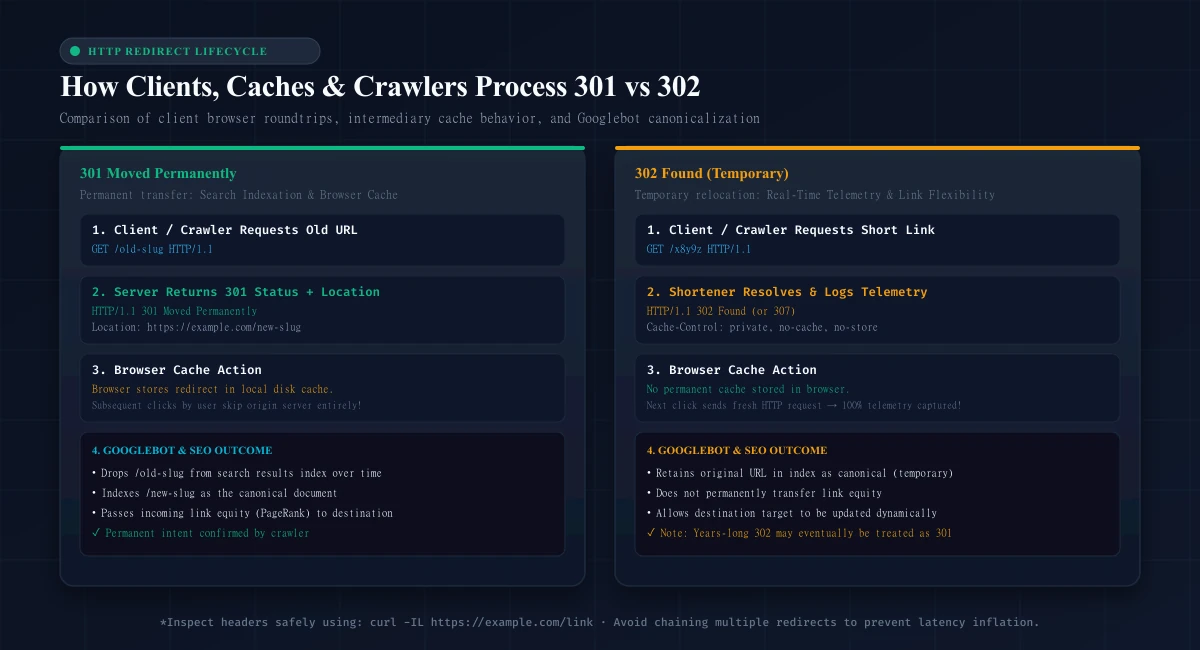
Google's indexing pipeline treats redirect status codes as signals, not absolute commands. When Googlebot encounters a redirect, it evaluates multiple canonicalization inputs:
- The HTTP response status code (301 vs 302 vs 307 vs 308)
- Rel=canonical link tags on destination pages
- Internal and external inbound backlink profiles
- XML Sitemap declarations
┌────────────────────────────────────────────────────────────────────────┐
│                   GOOGLEBOT CANONICALIZATION BEHAVIOR                  │
│                                                                        │
│  301 Encountered:  Googlebot immediately treats the destination as     │
│                    canonical. Inbound link equity shifts to target.    │
│                                                                        │
│  302 Encountered:  Googlebot retains the origin URL as canonical.      │
│                    Inbound link equity remains at the origin.          │
│                                                                        │
│  Long-Lived 302:   If a 302 redirect remains unchanged for months,    │
│                    Google's algorithms may interpret it as permanent   │
│                    and eventually swap canonicalization to the target! │
└────────────────────────────────────────────────────────────────────────┘
The Long-Lived 302 Phenomenon: If you implement a 302 redirect and leave it active for an extended period (months or years), Google's indexing systems may determine that the "temporary" change is effectively permanent. In such cases, Googlebot may autonomously begin passing link equity and indexing the destination URL. However, relying on this fallback is poor engineering; if a move is permanent, explicitly declare it with a 301.
Which Redirect Should You Use for SEO?
Selecting between 301 and 302 depends on your strategic objective:
Scenarios Demanding a 301 (Permanent) Redirect:
- Domain Name Migrations: Moving
oldbrand.comtonewbrand.com. A 301 informs search engines to transfer indexation, organic traffic, and backlink authority to the new domain. - HTTP to HTTPS Enforcement: Upgrading insecure web traffic. Every
http://request must permanently redirect to itshttps://counterpart. - URL Hierarchy Restructuring: Consolidating content, updating product categories (e.g.,
/products/shoes/sneakersto/footwear/sneakers), or fixing CMS slug structures. - Resolving Trailing Slash & WWW Canonicalization: Enforcing a single canonical hostname (e.g., permanently redirecting
www.example.comtoexample.comor stripping trailing slashes). - Consolidating Duplicate Content: Merging outdated blog posts into a comprehensive master guide.
Scenarios Demanding a 302 (Temporary) Redirect:
- A/B and Split URL Testing: Routing 50% of traffic to a new checkout variation (
/checkout-variant-b) while keeping the main/checkoutURL indexed. - Seasonal or Out-of-Stock Promotions: Temporarily forwarding users from a sold-out product page to a category hub during a flash sale.
- Device or Geolocation Routing: Forwarding mobile users to a mobile-specific path or international users to a localized directory (
/fr/) based on IP or headers. - Maintenance Windows: Forwarding traffic to a temporary maintenance page during scheduled server updates.
- Campaign Tracking & Short Links: Routing clicks through dynamic link management platforms.
301 vs 302 for URL Shorteners
A common question among SaaS developers and marketers is: "Should a URL shortener use 301 or 302 redirects?"
While traditional SEO advice suggests 301 for everything, URL shortening services overwhelmingly rely on 302 (or 307) temporary redirects.
Here is why:
1. Preserving Click Analytics and Telemetry
If a URL shortener returns a 301 status code without strict cache-control headers, the visitor's browser stores the redirect in its local cache.
If that user clicks the short link again tomorrow, their browser does not send an HTTP request to the shortener. Instead, it resolves the destination directly from local disk cache!
User Click 1:  Browser  ──►  Shortener Server (301)  ──►  Destination URL  (Click Logged)
User Click 2:  Browser  ───────────────────────────────►  Destination URL  (MISSED! No server hit)
By issuing a 302 Found (or pairing redirects with Cache-Control: private, no-cache, no-store, must-revalidate), the shortener forces the browser to hit the server on every click, ensuring 100% telemetry capture for click counts, geographic origins, devices, and referrers.
2. Destination URL Flexibility (Dynamic Links)
The primary value of an enterprise link management tool like URLShortPilot or a branded short domain is that the destination URL can be updated after publication.
If you print a 301 short link on 10,000 physical conference brochures and subsequently change the destination target in your dashboard, users whose browsers previously scanned the code will continue loading the old destination from cache. With 302/307 redirects, destination updates take effect globally in real time.
3. URLShortPilot's Implementation
In URLShortPilot's edge architecture, short code routing supports both modes:
- Default Resolution: Returns an HTTP 302 redirect with
Cache-Control: private, no-cache, no-store, must-revalidate, guaranteeing real-time analytics logging in Redis and PostgreSQL. - Configurable Redirect Types: For enterprise users who explicitly require permanent link equity transfer on dedicated custom domains, URLShortPilot allows configuring links as
PERMANENT301orPERMANENT308. - Protected Link Handling: Password-protected links utilize an HTTP 307 Temporary Redirect when forwarding unauthenticated visitors to
/unlock/[shortCode], strictly preserving request parameters.
For a comprehensive breakdown of link storage, Redis caching, and edge routing, explore our deep architectural guide on how URL shorteners work.
Redirect Caching and Analytics Implications
Understanding how web browsers and proxy caches treat HTTP redirects is crucial for preventing broken workflows.
Browser Caching of 301 Redirects
When a browser receives a standard 301 Moved Permanently without explicit caching restrictions:
- The browser saves the mapping in its internal redirect cache with an indefinite expiration.
- Clearing ordinary browser cookies does not always flush the redirect cache; users often must clear their entire browser history or open an incognito session.
- Development Warning: Never test 301 redirects on your primary browser during staging or development. If you make a configuration error, your browser may remain stuck redirecting to a broken URL for days.
Cache-Control Header Control
Servers can explicitly override default caching semantics using the Cache-Control header:
HTTP/1.1 301 Moved Permanently
Location: https://example.com/new-page
Cache-Control: max-age=3600
This instructs clients that while the move is permanent, the cached directive must be revalidated after 3,600 seconds (1 hour).
For temporary redirects where zero client caching is required:
HTTP/1.1 302 Found
Location: https://example.com/target
Cache-Control: private, no-cache, no-store, must-revalidate
Pragma: no-cache
Expires: 0
307 vs 308: Other Redirect Codes Explained
The HTTP/1.1 standard introduced two additional status codes to resolve a long-standing ambiguity in 301 and 302 implementations:
┌───────────────────────────┬───────────────────────────┐
│ Legacy Status Codes       │ Modern Strict Counterparts│
│ (May Mutate POST to GET)  │ (Guarantees Method/Body)  │
├───────────────────────────┼───────────────────────────┤
│ 301 Moved Permanently     │ 308 Permanent Redirect    │
│ 302 Found (Temporary)     │ 307 Temporary Redirect    │
└───────────────────────────┴───────────────────────────┘
HTTP 307 Temporary Redirect (RFC 9110 §15.4.8)
A 307 redirect functions identically to a 302 in terms of temporary intent and SEO canonicalization. However, 307 strictly prohibits user agents from changing the HTTP request method.
If a client sends an HTTP POST request with form data to /submit-form, and the server returns a 302, legacy browsers frequently resend the request to the new URL as an empty GET request, dropping form data.
A 307 guarantees that the browser repeats the POST request with the original payload intact.
HTTP 308 Permanent Redirect (RFC 9110 §15.4.9)
Similarly, an HTTP 308 is the modern, strict counterpart to a 301. It signals permanent relocation to search engines and passes PageRank identically to a 301, while guaranteeing that the HTTP request method and body are preserved across the redirect.
How to Check a Redirect Status Code
Never rely on a web browser's address bar to diagnose redirects. Browsers follow redirects instantly and display only the final landing URL, hiding status codes, intermediate hops, and header directives.
Use safe terminal commands to inspect raw HTTP headers:
1. Inspecting the Immediate Status Code
To inspect only the initial server response without following the redirect, use curl -I:
curl -I https://example.com/old-pageExample Output:
HTTP/2 301
location: https://example.com/new-page
cache-control: public, max-age=86400
date: Thu, 08 Oct 2026 14:00:00 GMT
2. Following the Complete Redirect Chain
To follow every hop in a redirect sequence and inspect each intermediate status code, use curl -IL:
curl -IL https://example.com/old-pageExample Output:
HTTP/2 301
location: https://example.com/intermediate-page

HTTP/2 302
location: https://example.com/final-destination

HTTP/2 200
content-type: text/html; charset=UTF-8
3. Crucial Caveat: HEAD vs. GET Requests
The curl -I command sends an HTTP HEAD request. In many web applications, edge proxies, and serverless runtimes, servers are configured to handle HEAD requests differently from GET requests (e.g., returning an immediate 204 or omitting analytics middleware).
If you suspect a server behaves differently for GET requests, perform a full GET inspection while suppressing the response body:
curl -s -o /dev/null -D - https://example.com/old-page-s: Silent mode (hides progress meters).-o /dev/null: Discards the HTML payload.-D -: Dumps response headers directly to standard output.
Common Redirect Mistakes
Avoid these frequent production pitfalls to protect your site's SEO performance:
- Redirect Chains (Multi-Hop Redirects):
- Problem:
Page A (301) -> Page B (301) -> Page C (200). - Impact: Every intermediate hop introduces 100–300 ms of network latency, slows down mobile users, and consumes crawler budget. Googlebot may stop following chains exceeding 5 hops.
- Fix: Update Page A's redirect to point directly to Page C.
- Redirect Loops:
- Problem:
Page A -> Page B -> Page A. - Impact: Triggers
ERRTOOMANY_REDIRECTSin browsers and causes search engines to abandon indexing both pages.
- Using 302 for Permanent Site Migrations:
- Problem: Migrating domains using 302 redirects.
- Impact: Search engines continue displaying the old domain in search results and delay link equity transfer.
- Stripping UTM Tracking Parameters:
- Problem: Redirecting
example.com/promo?utm_source=emailtoexample.com/promo/while dropping the query string. - Impact: Destroys campaign attribution in Google Analytics 4. Always ensure your server config preserves query strings (
$is_args$argsin NGINX or{uri}in Caddy). For best practices on campaign attribution, review our guide on UTM tagging best practices for GA4.
- Redirecting All Broken Pages to the Homepage:
- Problem: Bulk redirecting 500 deleted product URLs to the root domain (
/). - Impact: Google treats mass redirects to irrelevant pages as Soft 404s, negating any link equity transfer. If content is permanently deleted and has no direct replacement, serve an HTTP 404 or 410 Gone.
Troubleshooting Redirect Chains and Loops
When diagnosing redirect issues across large websites, execute this structured troubleshooting workflow:
┌────────────────────────────────────────────────────────────────────────┐
│                   REDIRECT DIAGNOSTIC WORKFLOW                         │
│                                                                        │
│ 1. Trace Chain     ──► curl -IL https://domain.com/path                │
│ 2. Audit Hops      ──► Count hops; ensure exactly ONE 301/302 hop      │
│ 3. Check Canonical ──► Verify destination <link rel="canonical"> matches│
│ 4. Check Query     ──► Ensure UTM parameters and query strings survive │
└────────────────────────────────────────────────────────────────────────┘- Audit Protocol and Host Canonicalization: Ensure that a request from
http://example.comtohttps://www.example.comresolves in a single hop rather than chainingHTTP -> HTTPSfirst and thennon-WWW -> WWW. - Review Edge Proxy Configurations: In architectures utilizing reverse proxies like Cloudflare or Caddy alongside application servers, verify that the proxy and the backend application do not have conflicting canonical redirect rules.
Frequently Asked Questions
Does Google treat 301 and 302 redirects the same?
No. While Google transfers PageRank through both over time, a 301 is an explicit, immediate signal to index the destination URL and retire the source. A 302 signals that the move is temporary, instructing Google to keep the source URL indexed.
Can I change a 302 redirect to a 301 later?
Yes. Changing server configuration from 302 to 301 is safe and straightforward. Once Googlebot crawls the link and observes the new 301 status, it will begin processing the permanent canonicalization transfer.
Why do URL shorteners use 302 instead of 301?
URL shorteners rely on 302 (or 307) redirects to prevent web browsers from permanently caching destinations locally. This ensures that every click hits the shortener server to log click analytics and allows users to update destination URLs dynamically.
How many redirect hops will Google follow?
Googlebot will follow up to 10 redirect hops, but official documentation notes that chains longer than 5 hops frequently cause crawling to be abandoned. Best practice is to ensure every redirect resolves in exactly one hop (A -> B).
What is the difference between 301 and 308?
Both signal permanent relocation and pass link equity. However, a 301 allows browsers to mutate the request method from POST to GET, whereas a 308 strictly requires user agents to preserve the original HTTP method and body.
Final Checklist and Conclusion
Before deploying redirects across your infrastructure, verify each item on this pre-flight checklist:
- [ ] Intent Confirmed: Use 301/308 for permanent moves; use 302/307 for temporary campaigns and URL shorteners.
- [ ] Single Hop: Redirect points directly to the final destination without intermediate hops.
- [ ] Query Parameters Preserved: Query strings and UTM tags are passed to the target URL.
- [ ] Terminal Tested: Verified using
curl -ILandcurl -s -o /dev/null -D -. - [ ] Destination Valid: Destination returns an HTTP 200 OK and possesses a matching self-referencing canonical tag.
- [ ] No Redirect Loops: Tested in clean terminal environments without caching conflicts.
Managing links across dynamic marketing campaigns requires infrastructure that routes traffic with low latency while protecting campaign telemetry. Explore URLShortPilot's URL shortener or check our pricing plans to deploy branded, high-performance redirects for your business today.
Ready to streamline your links?
Create fast, secure short links with real-time analytics, custom domains, and enterprise-grade anti-abuse protections.
Related Technical Guides
Branded Short Links ROI: How to Measure the Value of Branded URLs
Learn how to measure the ROI of branded short links: formulas for incremental contribution profit, A/B testing protocols, GA4 attribution, and domain cost analysis.
UTM Tagging Best Practices: How to Track Campaigns in Google Analytics 4
Master UTM tagging best practices for GA4. Learn parameter syntax, naming conventions, channel groupings, redirect preservation, and troubleshooting.
QR Code Print Size & Resolution Guide: DPI, Dimensions and Best Practices
Master QR code print size, resolution, and DPI calculations. Learn minimum dimensions, quiet zone rules, error correction trade-offs, and prepress testing.